Trainer suites
Assume you need to train multiple GRADIEND models that share the same
TrainingArguments (and usually the same data). You can:
- Use a trainer suite —
SymmetricTrainerSuiteorPositiveTrainerSuitebuilds one child per pair from shared constructor kwargs and provides suite-level evaluation and comparison (similarity heatmaps, cross-encoding, etc.). - Use a trainer collection —
TrainerCollectiongroups trainers you already built (or flattens several suites) when children differ in data, args, or how they were constructed. Pass trainers directly; ids come from eachtrainer.run_id. - Do it fully manually — create trainers, call
train()on each, load models, and run comparison plots yourself (only when you do not need groupedtrain()).
A suite is worth it when many related pairwise runs share one trainer class and mostly shared kwargs. A collection is worth it when you need one place to train or iterate heterogeneous runs (e.g. several suites plus a lone trainer for a cross-task heatmap).
Suite vs collection — which tool?
| Situation | Use |
|---|---|
Same trainer class, shared data/args, pairs from target_classes or pair_definitions |
SymmetricTrainerSuite or PositiveTrainerSuite |
| Mix hand-built trainers, or combine several suites / a suite + extra trainers | TrainerCollection |
| One-off single GRADIEND | TextPredictionTrainer only |
TrainerCollection does not generate children from pair definitions and does
not provide suite comparison plots (plot_similarity_heatmap, etc.). Use it to
train() a fixed set of trainers and to obtain a flat trainers dict for
comparison helpers (compute_similarity_matrix, plot_cross_encoding_heatmap, …)
that take Dict[str, Trainer].
Symmetric vs positive — which suite?
Each child GRADIEND still trains on two target_classes. The suite type only
matters for how those pairs are defined:
SymmetricTrainerSuite— neither class is privileged (e.g., genders, races, articles, pronouns)PositiveTrainerSuite— each contrast has a positive and negative pole (e.g., good vs bad, formal vs informal, commutative vs non-commutative).
Quick check: if swapping the two class names would change what the contrast
means, use PositiveTrainerSuite. If A vs B is the same task as B vs
A, use SymmetricTrainerSuite.
SymmetricTrainerSuite
Use when classes are peers — no class is inherently the “positive” side.
Pass target_classes; the suite trains one child GRADIEND per unordered pair.
from gradiend import (
    SymmetricTrainerSuite,
    TextPredictionTrainer,
    TrainingArguments,
)

RACE_CLASSES = ["asian", "black", "white"]

suite = SymmetricTrainerSuite(
    TextPredictionTrainer,
    model="distilbert-base-cased",
    data="aieng-lab/gradiend_race_data",
    eval_neutral_data="aieng-lab/biasneutral",
    target_classes=RACE_CLASSES,
    args=TrainingArguments(
        experiment_dir="runs/race_suite",
        max_steps=100,
        fail_on_non_convergence=True,
    ),
)

suite.train()
:material-file-code-outline: train_race_symmetric_suite.py
This yields three children — asian__black, asian__white, and black__white —
one TextPredictionTrainer per combinations(RACE_CLASSES, 2). Default child_id
values sort the two class names alphabetically (black__white, not white__black).
Regardless of how you choose children (see below), construction always builds one
trainer per child, stores checkpoints under experiment_dir/<run_id>/<child_id>/,
and validates that each pair has training transitions in the data.
Choosing children
| You pass | What happens |
|---|---|
target_classes=["a","b","c"] |
All combinations(..., 2) — as in the example above |
target_pairs=[("a","b"), ("a","c")] |
Only those pairs; default child_id / label |
pair_definitions=[SuitePairDefinition(...), ...] |
Explicit manifest — full per-child control |
| Nothing explicit | Classes inferred from data columns / HF per-class layout |
Subset of pairs with target_pairs
When you do not want every combination, list the pairs explicitly. Default checkpoint
names stay classA__classB:
SymmetricTrainerSuite(
    TextPredictionTrainer,
    model="distilbert-base-cased",
    data="aieng-lab/gradiend_race_data",
    target_classes=["asian", "black", "white"],
    target_pairs=[("white", "black"), ("white", "asian")],
    args=TrainingArguments(experiment_dir="runs/race_subset", max_steps=100),
)
Two children: black__white and asian__white (black/asian omitted).
Full control with pair_definitions
Use pair_definitions when you need custom child_id or label per child (e.g.
stable run names for a paper). Each child is one SuitePairDefinition:
| Field | Role |
|---|---|
target_classes |
(required) The two classes this child trains on |
child_id |
Checkpoint subdir and suite.get_trainer(...) key (default: classA__classB, classes sorted A≤B) |
label |
(optional) Name on suite comparison plots (default: A <-> B) |
Same two-pair subset as target_pairs above, with explicit ids:
from gradiend import (
    SuitePairDefinition,
    SymmetricTrainerSuite,
    TextPredictionTrainer,
    TrainingArguments,
)

suite = SymmetricTrainerSuite(
    TextPredictionTrainer,
    model="distilbert-base-cased",
    data="aieng-lab/gradiend_race_data",
    pair_definitions=[
        SuitePairDefinition(
            target_classes=("white", "black"),
            child_id="race_white_black",
        ),
        SuitePairDefinition(
            target_classes=("white", "asian"),
            child_id="race_white_asian",
        ),
    ],
    args=TrainingArguments(experiment_dir="runs/race_subset", max_steps=100),
)

suite.train()
What you can do after training
# Per-child access (same API as a single trainer)
trainer = suite.get_trainer("black__white")
trainer.evaluate_decoder(plot=True)
# Encoder eval on every child (cached per child under experiment_dir)
suite.evaluate_encoder(split="test", plot=True, full_eval=True)
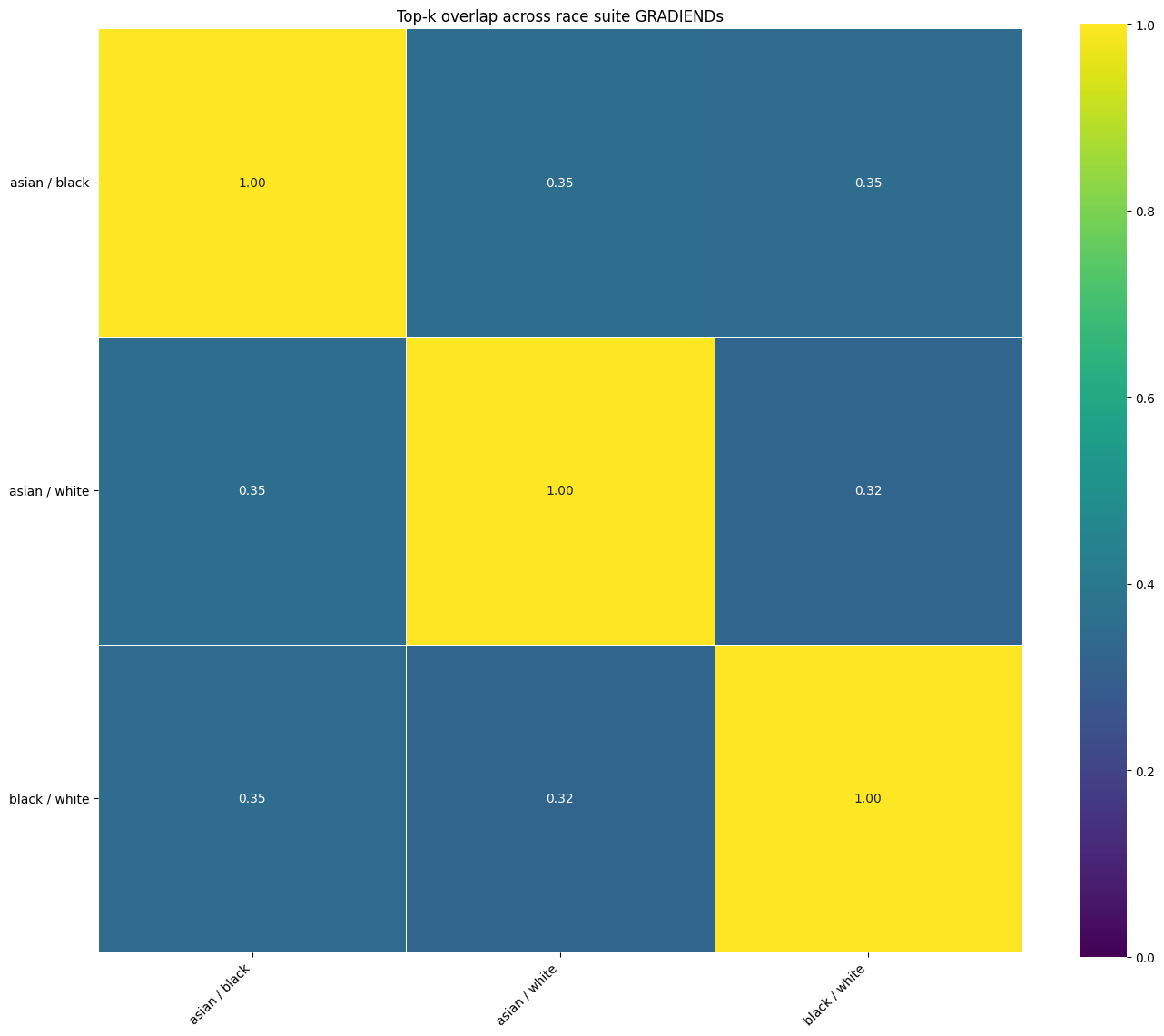
suite.plot_topk_overlap_heatmap(topk=1000, value="intersection_frac", output_path="suite_topk_overlap.png")
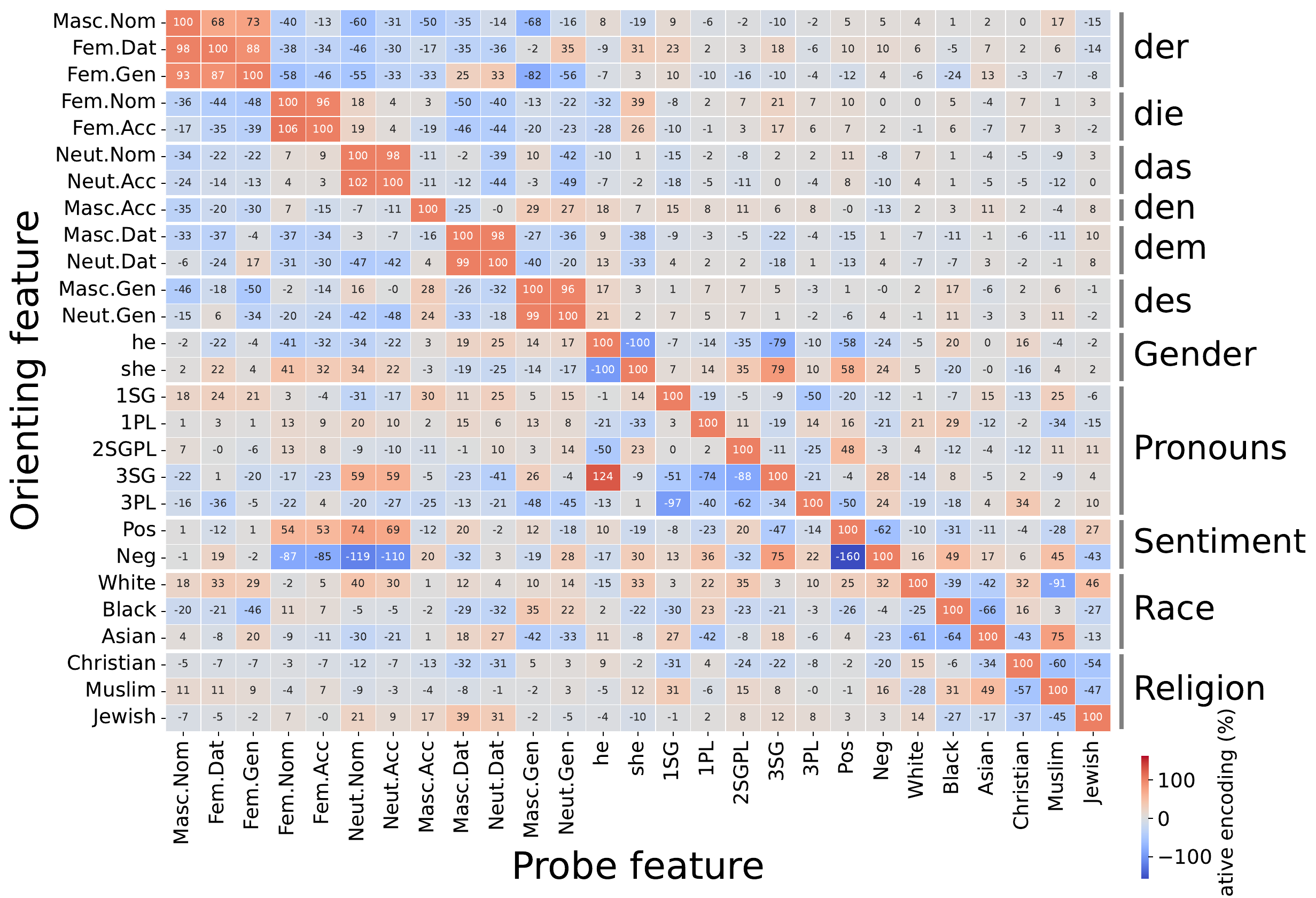
suite.plot_cross_encoding_heatmap(
    ["white", "black", "asian"],
    split="test",
    alignment="counterfactual",
    output_path="suite_cross_encoding.png",
)
:material-file-code-outline: train_race_symmetric_suite.py
Larger demos
For cross-task grids beyond one homogeneous suite:
:material-file-code-outline: multilingual_gradiend_demo_small.py
:material-file-code-outline: multilingual_gradiend_demo.py
See Oriented cross-encoding matrix.
PositiveTrainerSuite (directed positive vs negative)
Use this suite when each contrast has a privileged positive direction: sentiment (good vs bad), property present vs absent, etc.
from gradiend import (
    PositiveFeatureDefinition,
    PositiveTrainerSuite,
    TextPredictionTrainer,
    TrainingArguments,
)

suite = PositiveTrainerSuite(
    TextPredictionTrainer,
    model="bert-base-uncased",
    data=training_data,
    eval_neutral_data=neutral_data,
    positive_feature_definitions=[
        PositiveFeatureDefinition(
            positive_feature_class="good",
            negative_feature_class="bad",
        ),
        PositiveFeatureDefinition(
            positive_feature_class="happy",
            negative_feature_class="sad",
        ),
    ],
    args=TrainingArguments(
        experiment_dir="runs/sentiment_suite",
        max_steps=500,
        fail_on_non_convergence=True,
    ),
)

suite.train()
suite.evaluate_encoder(split="test")
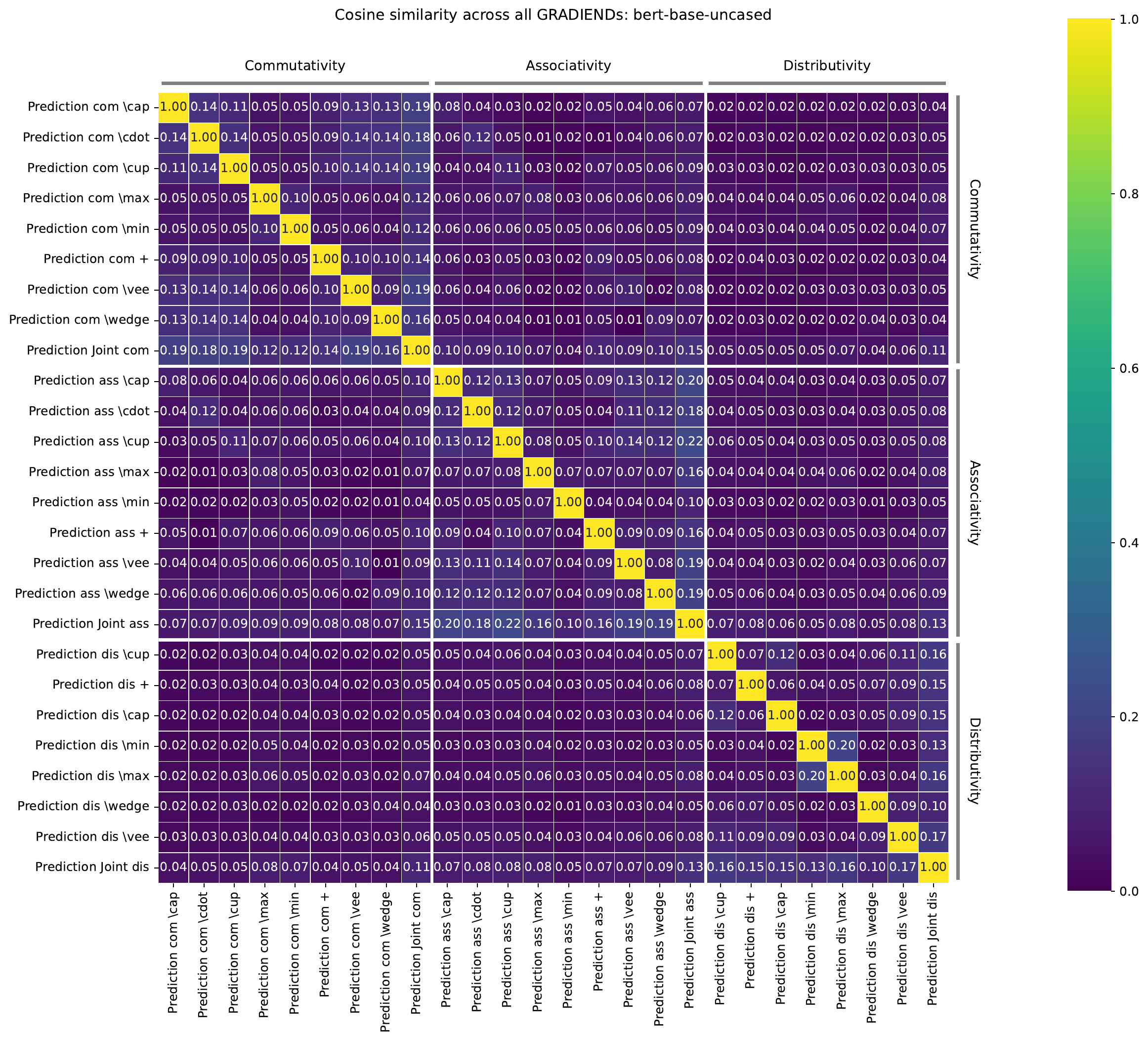
suite.plot_similarity_heatmap(measure="cosine", output_path="suite_similarity.png")
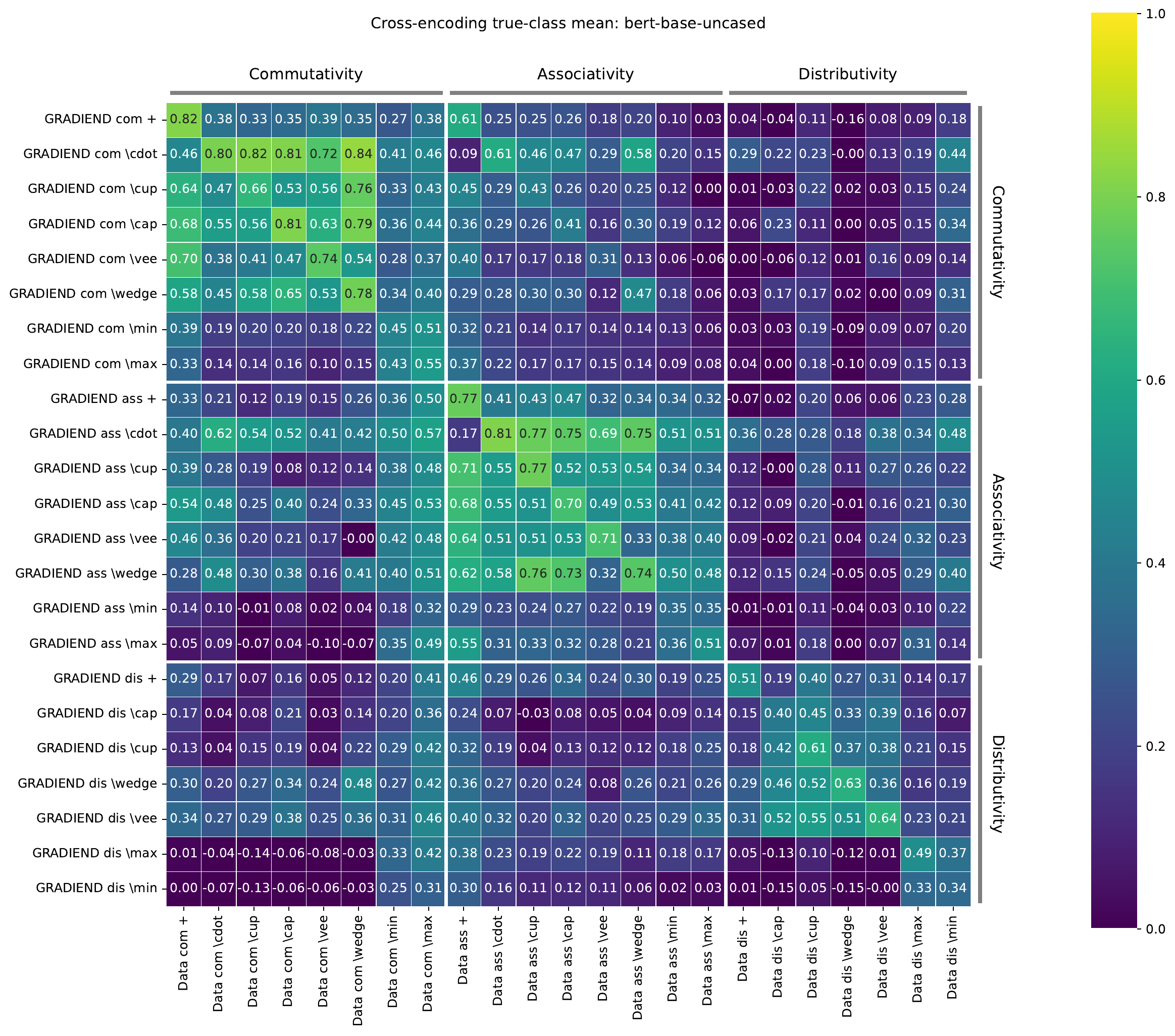
suite.plot_cross_encoding_heatmap(
    output_path="suite_cross_encoding.png",
)
:material-file-code-outline: train_sentiment_positive_suite.py
Default mode="single": one child GRADIEND per PositiveFeatureDefinition above.
PositiveFeatureDefinition
| Field | Role |
|---|---|
positive_feature_class |
Class treated as the positive pole |
negative_feature_class |
Opposite pole |
label |
(optional) Display name in plots |
Each definition becomes one child: positive_feature_class vs negative_feature_class,
with positive_class stored on the pair for cross-encoding.
Cross-encoding on positive suites
suite.plot_cross_encoding_heatmap(
    metric="positive_mean",   # or "negative_mean", "positive_minus_negative"
    normalize=False,          # True: divide each row by its diagonal
)
Cell (A, B): how well GRADIEND trained for pair A encodes data from contrast B,
with sign aligned to A’s positive class. See Cross-model comparison.
Optional: mode="all_but_one"
Purpose: train one GRADIEND per leave-one-out holdout. Each child learns a single
positive vs negative axis by merging all other word pairs — useful when you want
a union-of-contrasts model with one feature (or group) excluded, e.g. to test whether
a GRADIEND trained without valence still encodes valence transitions.
Compare with the example above (mode="single"): there you get one child per pair.
Here you get one child per held-out pair, or per held-out feature_class_group when
every definition sets that field.
:material-file-code-outline: train_sentiment_positive_suite_all_but_one.py
With default --holdout group the suite builds four children:
child_id |
Held-out group | Merged positive classes |
Merged negative classes |
|---|---|---|---|
holdout_group__quality |
quality | happy, excited, love, fast | sad, bored, hate, slow |
holdout_group__valence |
valence | good, love, fast | bad, hate, slow |
holdout_group__affection |
affection | good, happy, excited, fast | bad, sad, bored, slow |
holdout_group__pace |
pace | good, happy, excited, love | bad, sad, bored, hate |
With --holdout feature (no feature_class_group), you get five children —
one per held-out word pair (holdout__good__bad, holdout__happy__sad, …).
Comparison plots: use plot_similarity_heatmap (parameter overlap between
holdout models). Do not use plot_cross_encoding_heatmap here — every child
trains on the same synthetic positive/negative classes, so cross-encoding columns
would be identical and the heatmap is flat across each row. Cross-encoding heatmaps
are for mode="single", where each child has distinct word-pair target_classes.
TrainerCollection
Use when trainers are already built or come from incompatible suite configs
(different datasets, TrainingArguments, or pair manifests). Each passed trainer must have a
non-empty run_id; that becomes the collection key.
from gradiend import TextPredictionTrainer, TrainerCollection, SymmetricTrainerSuite

# Hand-built trainers
good_bad = TextPredictionTrainer(..., run_id="sentiment_good_bad", ...)
trainers = TrainerCollection(good_bad, other_trainer)

# Flatten several suites and standalone trainers
trainers_by_id = TrainerCollection.merge(
    race_suite,
    religion_suite,
    gender_en_trainer,
).trainers
Combining a suite with extra trainers
When one child needs different data or args than the rest of a suite, build a
SymmetricTrainerSuite for the homogeneous part and merge in the outlier:
full_suite = SymmetricTrainerSuite(
    TextPredictionTrainer,
    pair_definitions=[...],  # positive <-> negative
    ...
)
good_bad_trainer = TextPredictionTrainer(
    ...,
    config=TextPredictionConfig(run_id="sentiment_good_bad", ...),
)

sentiment = TrainerCollection.merge(
    full_suite,
    good_bad_trainer,
    retain_models_in_memory=False,
)
sentiment.train(use_cache=True)
What TrainerCollection provides
| Method / attribute | Purpose |
|---|---|
TrainerCollection(*trainers) |
Group trainers keyed by trainer.run_id |
TrainerCollection.merge(*parts) |
Combine Trainer, TrainerSuite, and/or TrainerCollection |
.trainers |
Dict[str, Trainer] for comparison APIs |
.train(use_cache=...) |
Train every child in order |
.items() / .get_trainer(id) |
Same iteration pattern as TrainerSuite |
When flattening a TrainerSuite, keys are the suite child ids from
suite.items() (equal to trainer.run_id when the suite has no parent run_id).
Memory: retain_models_in_memory=False unloads each child after an uncached
train(), same idea as on TrainerSuite.
Not included: suite-only analytics (plot_similarity_heatmap,
plot_cross_encoding_heatmap on the group, annotate_data, shared base-model
caching across children). For those, keep children inside one TrainerSuite, or
call comparison functions on collection.trainers yourself.
What every suite provides (TrainerSuite base)
These work on both symmetric and positive suites:
| Method | Purpose |
|---|---|
suite.train() |
Train every child; returns {child_id: train_result} |
suite.evaluate_encoder(...) |
Encoder eval per child; full_eval=True on split="test" includes non-target transitions |
suite.evaluate_decoder(...) |
Decoder grid per child |
suite.evaluate(...) |
Full evaluate per child |
suite.call("method", ...) |
Forward any trainer method to all children |
suite.get_trainer(child_id) |
Single child TextPredictionTrainer |
suite.get_models(...) |
Load GRADIEND weights for comparison (gradiend_only=True skips base model) |
suite.compute_similarity_matrix(...) |
Numeric pairwise similarity |
suite.plot_similarity_heatmap(...) |
Heatmap of cosine / top-k overlap / etc. |
suite.plot_topk_overlap_heatmap(...) |
Top-k overlap specifically |
suite.plot_cross_encoding_heatmap(...) |
Oriented cross-encoding within one suite; see Oriented cross-encoding matrix for dense multi-class grids |
suite.annotate_data(...) |
One annotation pass on shared data (not per child) |
suite.clear_model_cache() |
Free GPU memory between heavy steps |
Memory: retain_models_in_memory=False (used in
train_sentiment_positive_suite.py) unloads each child after training/eval so many
GRADIENDs fit on one GPU. Default is True (faster re-analysis, more VRAM).
Output layout: with experiment_dir="runs/foo" and run_id="suite_name" on the
suite (optional), child checkpoints live at
runs/foo/suite_name/<child_id>/. Each child is a normal trainer run with its own
caches and plots.
Multi-seed suites
When children use multi-seed training (analyze_seed_stability=True,
saved_seed_runs="all_convergent"), suite comparison methods accept
seed_selection and dispersion:
:material-file-code-outline: train_multi_seed_stability.py
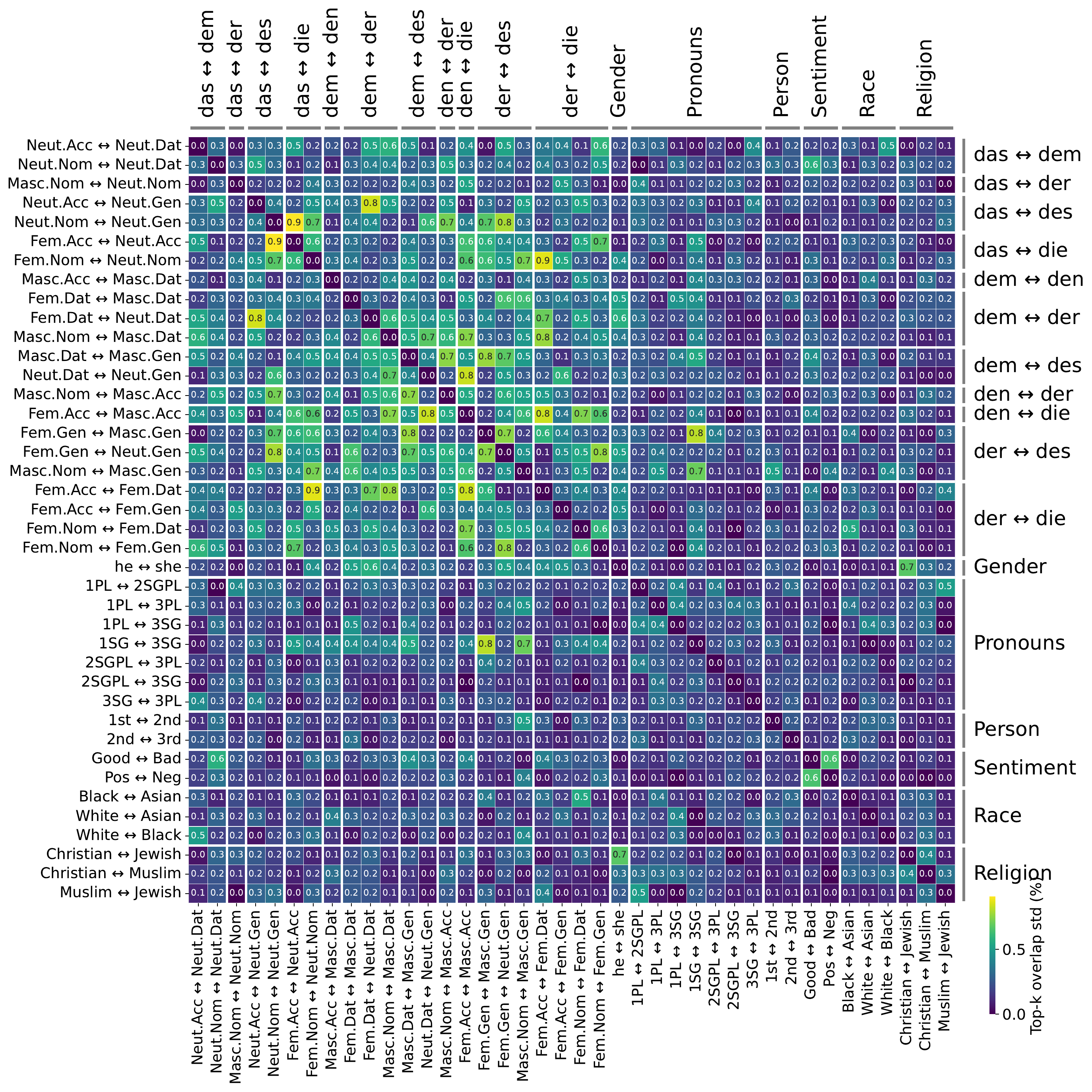
This dispersion view is a stability diagnostic, not the overlap matrix itself: each cell is the seed-to-seed standard deviation of the corresponding top-k overlap comparison after converting overlap values to percent. A value of 0.0 means the matched-seed overlap percentages are effectively identical across runs. A value of 0.7 means the standard deviation is 0.7 percentage points, so overlap values near a 42% mean would typically be only about 41.3%, 42.0%, and 42.7% across seeds; even the brightest cells here are small seed effects. The color scale is local to the observed dispersion range rather than fixed to the 0–100 overlap scale.
Heatmap cells can then show mean comparison values with seed spread. Enable only after single-seed children converge reliably — see Multi-seed analysis.
Related docs
- Oriented cross-encoding matrix — dense GRADIEND×transition and feature-aligned matrices across many pairwise runs
- Cross-model comparison — choosing similarity vs cross-encoding metrics
- Evaluation (inter-model) — top-k overlap tutorial
- Evaluation & visualization — heatmap customization